This article is part of my series on exploring Linux.
Like every other IT guy on the planet, I must use a word processor to write documents. Naturally, as a Windows user, I have been using MS Word - and for the past couple of years Word 2007 with the docx file format. Let's see how I handle the transition to Open Office...
Open Office is a free, open source word processor. It is included with Ubuntu and is also available for Windows. There is no doubt - it is a full featured word processor. It had every feature I was looking for. Perhaps a publisher might need more... but maybe not.
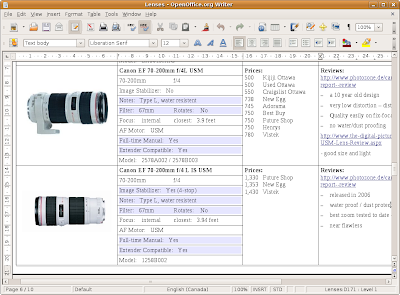
I tested it out by creating a document with a complex table (something I can get frustrated by in Windows). I included graphics, hyperlinks, custom styles, cell colouring and split cells. It did quite well:
The table formatting menu that Open Office provided put MS Word to shame!
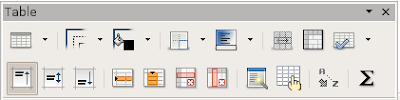
Although the menu was a pleasure to use, there were some problems. I could easily split cells, but then they became impossible to manage. There was no way I could select a row including split cells (as shown above) to save my life. This prevented bulk formatting, copying, etc. I had to actually copy each row and then manually split cells afterward.
Now, how about compatibility with the rest of the world? This isn't as big a problem as you might imagine. For one, my children's school just switched to Open Office (this seems to be a trend) so there is obviously no problem there. For the rest of us using MS Word in the work environment, Open Office supports most common file formats - let's test it!
I've heard that Open Office works very well with standard MS Word .doc files, but I've been using MS Word 2007 .docx files for the last while. Despite the docx format being only a couple years old, Open Office did a very good job of converting the file. But that's the problem. Open Office converts the document into something it can understand and it doesn't do a perfect job.
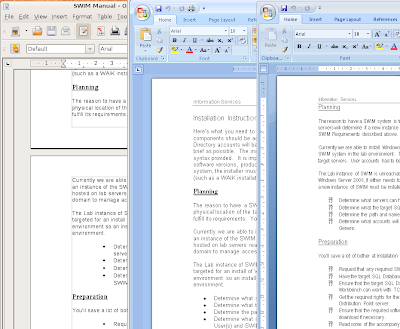
I tried editing some guides I had been working on. The documents had the usual headings, table of contents, page headers, cross-references, etc. But things just weren't right. Things like my indents were not the same and the page headers were all buggered. I quickly realized that I couldn't use Open Office to edit my work documents. There was no way I could check a document out from work, edit a couple paragraphs and return it in the same condition.
(Here's an example of the results. Open Office on the left, MS Word 2007 in the middle. (I'll discuss the image on the right in a moment.))
I realized I couldn't live without MS Word 2007, but I'm still dedicated to trying to do everything in Linux. It's time to try Wine.
Wine is an extremely interesting product. It's a Linux application that creates an environment into which a Windows application can be installed and used. Many people call Wine a Windows emulator, but it really isn't. There isn't the overhead of an emulator. Wine calls itself a "translation layer". It basically provides Windows applications with the Windows services it expects to find (such as the registry) in very much the same way that Windows does it. Apparently Wine is so efficient that people are able to play first-person shooter video games within it!
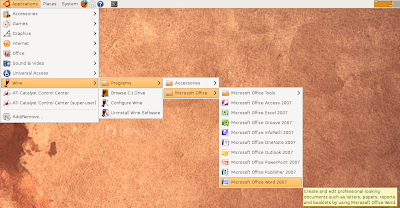
I used Wine to install and run MS Word 2007. I am now able to edit my work documents from my Linux PC and check them back into the office with no issue. Very cool! It's even quite neat how Wine integrates Windows applications with my desktop - it's almost seemless - take a look at the shortcuts:
However, as with everything, I found issues you may want to know about. Before I get to that, I'll cover how to install Wine and Word 2007.
To install wine:
It looks like my 64-bit version of Ubuntu complicated the installation of Wine a bit. I found some good instructions buried in this forum post that helped quite a bit. The first thing to do was to add a reference to a Wine repository to my system's list of APT sources for the version I am using - here's the command to enter into a Terminal window:
sudo wget http://wine.budgetdedicated.com/apt/sources.list.d/intrepid.list -O /etc/apt/sources.list.d/winehq.list
Next, I added the repository's key to my system's list of trusted APT keys:
wget -q http://wine.budgetdedicated.com/apt/387EE263.gpg -O- | sudo apt-key add -
Then I updated my package information and installed Wine:
sudo apt-get update
sudo aptitude install wine
Wine is now ready to be used to make Windows application work in Linux.
Installing an application (MS Word 2007 for instance) couldn't be easier. I just had to start the process from the Terminal window. I found the Windows commandline command for initiating an installation and just prefaced it with the word "wine" (i.e. wine setup.exe).
Because of Wine, the application's installer proceeded as I would normally expect. When it completed, I found shortcuts in the Applications menu under Wine|Programs.
I was very pleased. I then ran MS Word and opened one of my test docx files. The results are shown in that third example on the right in the earlier image above. Everything I tried in MS Word 2007 worked flawlessly. All my formatting and 'complex' document features were preserved (this is MS Word 2007 afterall). There were just two small problems...
Can you see the problems in the sample on the right as compared to the sample in the middle? For one thing I lost my bullets to some strange numbery thing. After some research I learned that the problem was with Linux/Wine not having the symbol.ttf font that Word uses to display the bullet symbol.
Luckily my machine is still licensed for Vista. I simply browsed the Vista NTFS partition for the missing font files and copied them to the folder Wine uses - in my case it was:
/home/gordon/.wine/dosdevices/c:/windows/fonts
Problem solved.
The only other very slight problem that you may have noticed from the earlier sample, is that the pagination / page formatting is out of wack. This seems to be due to a difference in the way fonts are handled - very much like when you change from one printer driver to another. This isn't a problem as long as I don't worry about the pagination at home and wait until I get to work to make sure things line up. If I don't disrupt the formatting of a document signed out from work, there are no issues at all.
As I worked with my documents, I noticed another generic Wine issue. I had troubles pasting screenshots from my Linux environment into my Word documents. It turns out that Linux and Windows handle paste buffers very differently. As a result, they don't always interact as one might hope. I had no troubles handling strings of text, but pictures were a no go. To circumvent this, I just had to save the picture as a file and then import that file into Word the usual way.
I was very impressed by what I was able to accomplish in Ubuntu regarding document editing even if it wasn't perfect. I look forward to the continued growth of Open Office both in capability and popularity. I am convinced it is the future.